

If your Shopify store feels slow, the problem is usually not one thing. It is theme bloat, heavy apps, oversized images, and third-party scripts adding up. Shopify site speed optimization is not about random fixes, it is about finding the biggest performance bottlenecks and improving the code that affects load time, Core Web Vitals, and conversion rate. Good Shopify site speed optimization also means reducing app overhead, improving image delivery, and removing unnecessary scripts. This guide covers the technical changes that make the biggest impact for growing stores.
Why speed matters for Shopify conversion rates
Shopify site speed optimization affects more than rankings. A slow storefront increases bounce rate, reduces product page engagement, and lowers add-to-cart completion. For commercial stores, Shopify site speed optimization is not just about improving a score in a report. It is about creating a faster buying experience that supports conversion rate, customer trust, and revenue growth.
Strong shopify speed optimization work improves page responsiveness, especially on mobile where most traffic often lands.
Start with a Shopify speed audit
Before making changes, run a proper shopify speed audit using Lighthouse, PageSpeed Insights, and Shopify’s built-in performance reports. Review homepage, collection pages, product pages, and cart templates separately because bottlenecks often differ by template. Focus on metrics tied to real user experience, especially Largest Contentful Paint, Interaction to Next Paint, and Cumulative Layout Shift. If you are tracking core web vitals shopify performance, use actual field data when available, not only lab scores. 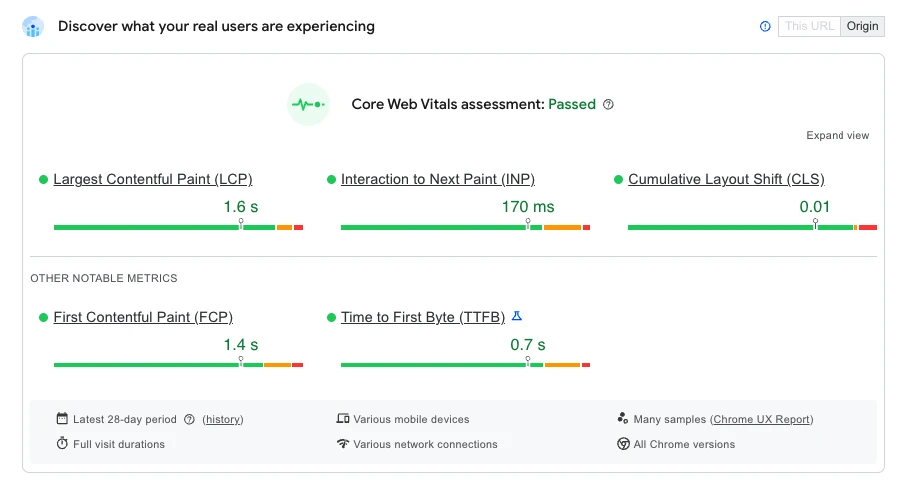
Theme bloat: the most common hidden slowdown
Many stores accumulate unused snippets, sections, and legacy scripts over time. Even if a theme looks clean visually, the code may still carry old features that load on every page. A core part of Shopify CRO and performance optimization is removing unused theme assets, limiting the number of sections rendered on the homepage, and replacing bulky UI components with simpler native theme features. Audit theme.liquid, global app embeds, and any custom JavaScript that runs sitewide. 
What to remove or simplify
- Unused sliders, animation libraries, and visual effects.
- Duplicate CSS and JavaScript loaded by old customizations.
- Large homepage sections that push key content below the fold.
- Third-party widgets inserted directly into the theme.
App scripts: reduce what loads on every page
Apps are one of the biggest speed killers in Shopify. Many install app scripts, tracking pixels, or front-end widgets that execute across the entire site, even where they are not needed. To improve Shopify speed, review every app and ask whether it is adding customer value proportional to its performance cost. Disable or uninstall anything that duplicates functionality or has low usage. If an app is required, check whether it supports conditional loading on only relevant templates. For stores with complex requirements, working with a SEO marketing agency or a shopify development agency can help you refactor app-heavy pages without breaking store functionality.
Images: optimize for speed without hurting quality
Image weight still causes major delays on Shopify product and collection pages. Compress images before upload, use modern formats where supported, and make sure dimensions match how the image is displayed. Do not upload 4000px files for a container that renders at 800px. Use responsive image markup so mobile devices receive smaller assets. Lazy-load below-the-fold images, but keep the primary hero image optimized and prioritized.
- Use WebP or similarly efficient formats where possible.
- Serve correctly sized product images.
- Compress banners, lookbooks, and blog visuals.
- Avoid autoplay video unless it is essential to conversion.
Third-party code: test every script against revenue impact
Analytics tools, chat widgets, affiliate pixels, review platforms, and attribution scripts can each add milliseconds that stack into visible lag. Some scripts are necessary, but many can be delayed until consent, interaction, or after the main content has loaded. When reviewing shopify site speed optimization opportunities, treat each external script as a cost that must earn its place. Load scripts asynchronously when possible and remove redundant tags from multiple tools.
Focus on the templates that affect buying
Not every page needs the same level of optimization. Product pages, collection pages, and cart steps influence conversion most, so prioritize those first. Compare render paths, above-the-fold content, and script usage across templates. If your store uses advanced merchandising, subscriptions, or custom pricing, speed work should be tested carefully to preserve functionality, especially for high-volume stores using Shopify Plus agency.
How to measure improvement correctly
After each change, measure the effect on both lab metrics and real user behavior. A faster score is useful only if it translates into better add-to-cart rates, lower bounce, and higher checkout completion. Compare before-and-after data for mobile and desktop separately. Keep a changelog so you can identify which fixes produced the biggest lift. That is the most practical way to improve shopify speed over time.
When custom features affect performance

Custom functionality becomes a performance issue when it adds too much front-end weight for too little business value. On Shopify, the biggest problems usually come from oversized JavaScript bundles, app scripts injected into the theme, features that execute before the page becomes interactive, and code that loads across the entire storefront instead of only on the templates that actually use it. This is why performance-focused Shopify development is not about avoiding custom features, but about building them selectively, keeping assets modular, and making sure each addition earns its place in the storefront experience.
A practical priority order for fastest wins
- Remove or defer unused app scripts.
- Compress and resize all key images.
- Clean up theme bloat and duplicate assets.
- Delay nonessential third-party trackers.
- Optimize product and collection templates first.
- Retest Core Web Vitals after each deployment.
For long-term growth, pair performance work with broader experimentation and technical updates. Many teams also review shopify growth & development insights to connect speed improvements with merchandising, UX, and revenue strategy.
Conclusion
The fastest Shopify stores are not always the ones with the fewest features. They are the stores that load only what shoppers need, when they need it. By focusing on theme bloat, app scripts, image payloads, and third-party code, you can make measurable gains in both speed scores and conversion performance. Treat shopify site speed optimization as an ongoing revenue project, not a one-time cleanup. If you want measurable speed gains, start with a technical review of your theme, apps, images, and third-party scripts. A focused shopify site speed optimization plan can help your store load faster, convert better, and scale with less friction. If you need expert support, our team can audit your storefront and prioritize the fixes that matter most.