
We build, migrate and support Shopify stores every day, so we see both sides of the platform: why merchants move to it, and where they hit its limits. This is our honest list of Shopify pros and cons in 2026, with the facts checked against Shopify’s own documentation and a practical workaround for every disadvantage.
Short answer:
- Shopify is the fastest way to launch and run a reliable online store. Hosting, security, checkout, payments and multichannel selling come built in.
- Its main disadvantages are fees when you cannot use Shopify Payments, hard limits on product options and variants, advanced checkout customization reserved for Shopify Plus, a fixed URL structure, and app costs that grow over time.
- Almost every limitation has a workaround. The question is whether the workaround costs less than the platform saves you.
Shopify pros
1. Fast to launch, with hosting and security included
Every plan includes unlimited web hosting, a free SSL certificate and a PCI-compliant checkout, so there is no server to manage, patch or scale. You can start from a free theme or the built-in store builder and take your first order the same day. For most brands this is the biggest saving: no infrastructure team and no emergency calls when a plugin update breaks the store.
2. One admin for every sales channel
Shopify lets you sell online, in person with Shopify POS, on marketplaces and social channels, and in AI chat assistants, with one product catalog, one inventory and one order list. For brands that sell in a physical store and online, keeping stock in sync without a separate integration is a real advantage.
3. A large ecosystem of apps, themes and experts
Reviews, subscriptions, loyalty, search, email and ERP connectors are usually an app install away, and the Theme Store covers most industries. Because Shopify is so widely used, it is also easy to find developers and agencies who know it, which lowers the risk of being stuck with one vendor.
4. B2B and international selling on every plan
This changed recently, and many guides are out of date. Shopify B2B is now available on Basic, Grow, Advanced and Plus. Every plan supports company accounts and locations, net payment terms, quantity rules and price breaks, and up to 3 B2B catalogs. Shopify Markets lets you sell in several countries with local currencies and domains from one store.
5. It scales from a first sale to enterprise
You can start on Basic and grow into Shopify Plus without replatforming. Plus adds a fully customizable checkout, unlimited B2B catalogs, higher API limits and expansion stores. If you need a fully custom front end, Shopify supports headless storefronts with its Hydrogen framework; see our guide on whether headless Shopify is worth it.
Shopify cons and limitations, and how to work around each one
1. Extra fees if you cannot use Shopify Payments
With Shopify Payments you pay only the card rate. With a third-party payment provider, Shopify adds its own fee on every order: 2% on Basic, 1% on Grow, 0.6% on Advanced and 0.2% on Plus. Currency conversion adds 1.5% for US stores and 2% elsewhere.
Workaround: use Shopify Payments where it is available, and pick your plan by the numbers. Our Shopify pricing 2026 guide explains every fee, and the free Shopify fees calculator shows which plan is cheapest for your sales.
2. Hard limits on product options and variants
A Shopify product can have up to 3 options (for example size, color and material) and up to 2,048 variants, with up to 250 media items. Stores with 500,000 or more variants can add only 10,000 new variants per day through apps or CSV imports; on Shopify Plus this daily limit does not apply. Furniture, print-on-demand and industrial catalogs often need more combinations than that.
Workaround: split very large products into several linked products, store extra attributes in metafields, or use a product options app or a custom app for configurators. On Plus, the Combined Listings app can show several products as one listing.
3. Advanced checkout customization requires Shopify Plus
On every plan you can brand the checkout with your logo, colors, fonts and background, and add apps to the thank you and order status pages. Advanced checkout customization, such as adding custom fields or logic inside the checkout steps, is available only on Shopify Plus.
Workaround: move logic before the checkout (cart page, product page) or after it (thank you page). If checkout changes would clearly lift conversion, compare the cost of Plus with the expected gain; our Shopify Plus pricing guide helps with that math.
4. Custom logic runs through apps and Shopify Functions
Shopify is a hosted platform, so you cannot run your own code on its servers or edit its database directly. Custom discounts, shipping and payment rules are built with Shopify Functions. Shopify Scripts, the older way to customize checkout logic on Plus, was deprecated on June 30, 2026, and Scripts that were still published have stopped working.
Workaround: rebuild custom rules as Functions or as a custom Shopify app. If your store still relied on Scripts, start with our guide to migrating Shopify Scripts to Functions.
5. A fixed URL structure
Shopify uses fixed paths such as /products/, /collections/, /pages/ and /blogs/. You cannot remove them or design your own hierarchy, which matters most when you migrate an established store with years of rankings.
Workaround: map every old URL to its new address and set up 301 redirects before launch. Our free Shopify migration checklist covers the full SEO process, and our Shopify migration team does it as part of every replatforming.
6. App costs add up
Features that other platforms include, or that you would build once, often come as monthly app subscriptions on Shopify. A handful of paid apps quickly becomes a noticeable line in the budget, and each app can add scripts that slow the store down.
Workaround: review your apps every quarter, remove what you do not use, and replace two or three overlapping apps with one custom app when the numbers make sense. See Shopify app costs: build vs buy.
7. The deepest B2B features are still Plus-only
B2B works on every plan, but some features stay on Plus: unlimited catalogs, catalogs assigned directly to a company for customer-level pricing, deposits, partial payments and payment requests per fulfillment.
Workaround: start with B2B on your current plan and upgrade when you need company-level pricing or payment flows. More detail in our guide to Shopify B2B without Plus.
Shopify limitations in numbers (2026)
These are the hard limits merchants run into most often, taken from Shopify’s plan comparison and developer documentation and checked in October 2026. Most of them only matter for large catalogs, bigger teams or several brands.
| Limit | Basic, Grow and Advanced | Shopify Plus |
|---|---|---|
| Product options | 3 per product | 3 per product |
| Variants | 2,048 per product | 2,048 per product |
| Media | 250 per product | 250 per product |
| New variants per day (stores with 500,000+ variants) | 10,000 | No daily limit |
| Staff accounts | None on Basic, 5 on Grow, 15 on Advanced | Unlimited |
| Inventory locations | 10 | 200 |
| B2B catalogs | Up to 3 | Unlimited |
| Headless storefronts | 1 | 25 |
| Expansion stores | Not included | Up to 9 included |
| API rate limits | Standard; up to 2x on select APIs on Advanced | Up to 10x on select APIs |
| Fee with a third-party payment provider | 2% / 1% / 0.6% | 0.2% |
| Checkout customization | Branding, plus apps on the thank you and order status pages | Custom fields and logic inside the checkout steps |
If one of these limits blocks your business model, check the workaround for it above before you rule Shopify out. Plan prices for each tier are in our Shopify pricing 2026 guide.
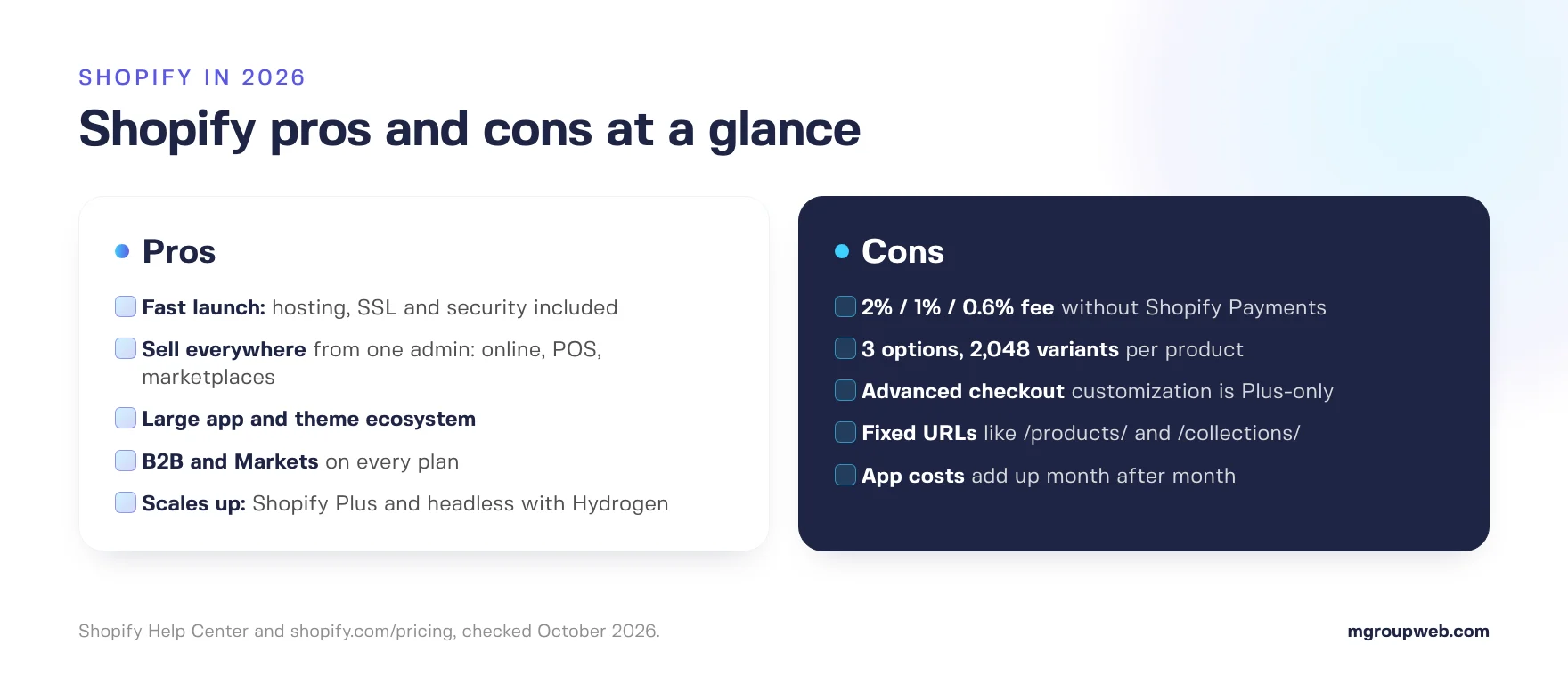
Shopify pros and cons at a glance
| Area | Pro | Con |
|---|---|---|
| Setup and hosting | Hosting, SSL and PCI-compliant checkout included | No server or database access |
| Costs | Predictable monthly plans | Extra 2% / 1% / 0.6% fee without Shopify Payments; app subscriptions |
| Catalog | Unlimited products | 3 options and 2,048 variants per product |
| Checkout | Branding and post-purchase apps on every plan | Advanced customization only on Plus |
| B2B | Companies, net terms and 3 catalogs on every plan | Company-level pricing and deposits only on Plus |
| SEO | Clean, fast storefronts and editable meta data | Fixed URL paths such as /products/ |
| Growth | Same platform from first sale to Plus and headless | Plus starts at $2,300 per month |
Who Shopify is right for, and who it isn’t
Shopify is a strong fit if you sell physical or digital products to consumers or businesses, want to launch quickly, sell across several channels, and prefer to spend your budget on marketing and product rather than on servers and maintenance.
Think twice if your products need more than 3 options or thousands of combinations without a configurator, you must use a payment provider that Shopify does not support in your country, or your checkout needs deep custom logic and Plus is out of budget. In those cases compare the alternatives honestly; we have done that in BigCommerce vs Shopify, Adobe Commerce vs Shopify and Ecwid vs Shopify.
Conclusion
For most online brands, Shopify’s advantages outweigh its limits: it is fast to launch, reliable, and it grows with the business. Its disadvantages are real, but they are predictable, and each one has a known workaround. If you are weighing a move to Shopify and want an honest view of what will work for your catalog and checkout, our Shopify migration experts can review your store before you commit.