
Merchants ask us the same question in different words: “Can my VIPs see a lower price?”, “How do I give wholesale buyers their prices without Shopify Plus?”, “Can I run a private sale only for my email list?” Shopify handles part of this out of the box. The rest depends on one detail most guides skip: where the customer sees their price — while browsing, or only at checkout. Here is every method as of November 2026, what each one shows and when to use it.
Short answer:
- Shopify can charge different customers different prices. Discount codes and automatic discounts can be limited to specific customers or customer segments, such as customers tagged VIP (Shopify Help Center).
- Showing that price before checkout is a separate choice. Shopify applies those discounts in the cart and checkout; product and collection pages keep the regular price unless an app or custom work shows the discounted one.
- Wholesale pricing does not require Shopify Plus. Native B2B catalogs work on Basic, Grow and Advanced, with up to three active catalog assignments; a price list per company needs Plus (B2B features by plan).
- Choose by the buying experience: a checkout discount for a simple promotion, visible member prices for a VIP club, company catalogs for business purchasing.
Can Shopify show different prices to different customers?
Yes. “Customer-specific pricing” on Shopify can mean a discount for selected shoppers, a company’s agreed prices, or different prices by market. The right setup depends on who qualifies and when they need to see their price.
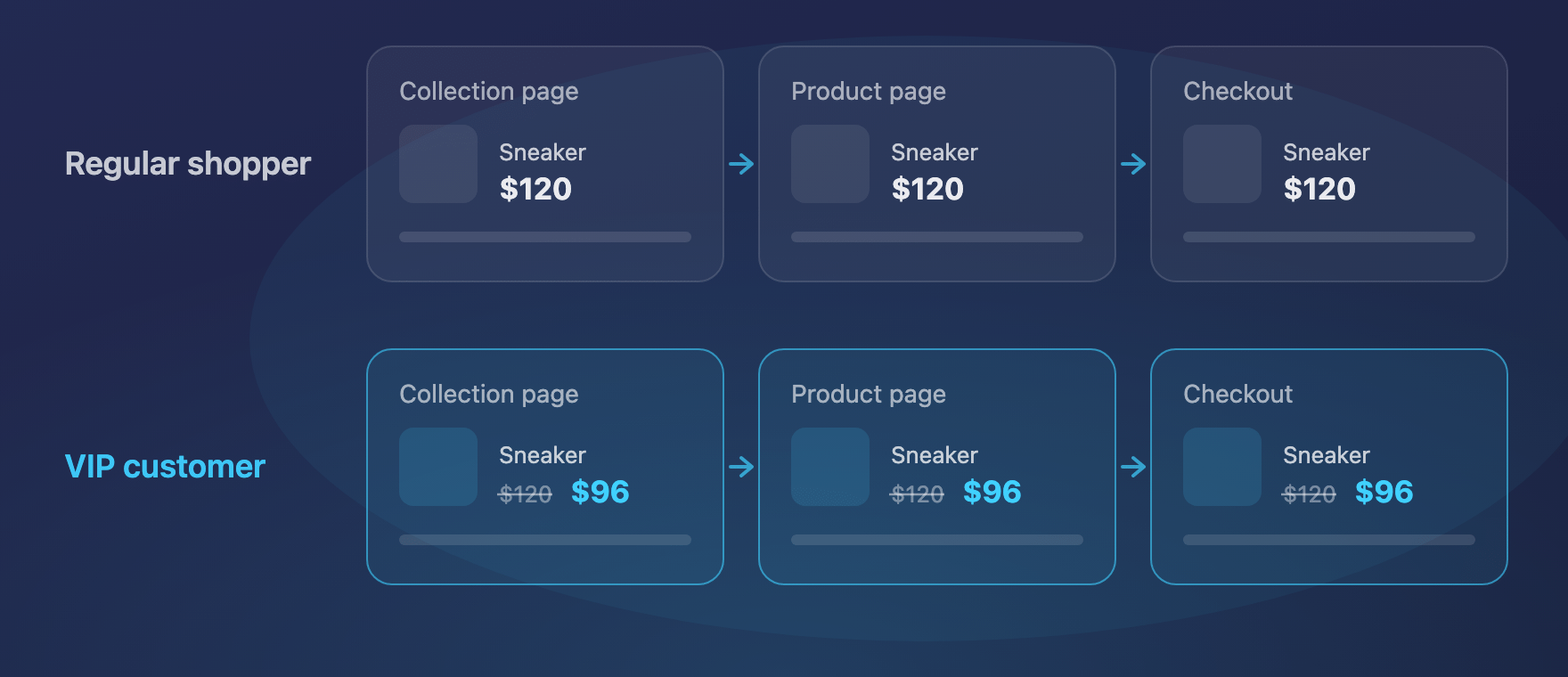
Take a $120 sneaker. Regular shoppers pay $120; VIP customers pay $96, a 20% discount. There are two possible experiences:
- The VIP sees $120 while browsing and gets the discount in the cart or at checkout.
- The VIP sees $96 on the collection and product pages, then pays $96 at checkout.
For a short promotion, the first is often enough. For an ongoing member benefit, showing the member price is what makes membership feel real: customers see what it gives them before they add anything to the cart.
Also separate customer group pricing from a negotiated price per customer. Giving every approved wholesaler 20% off is a different job from keeping separate agreed prices for each company and product. Write down the audience, the eligible products and the pricing rule before choosing a tool.
Which methods can you use, and what does each one show?
The main options are discounts, B2B catalogs, separate products, theme code edits and storefront pricing apps. They differ most in what shoppers see before checkout and in how you control who qualifies.
| Method | Collection and product pages | Cart and checkout | Without Plus? | Needs login? | Watch out for |
|---|---|---|---|---|---|
| Discount code for selected customers | Regular price | Discounted after the code is entered | Yes | No — eligibility is checked at checkout | Customers must receive and enter the code; unrestricted codes get shared |
| Automatic discount for a customer segment | Regular price | Discounted automatically | Yes | Not always — Shopify can identify the customer at checkout | Customers don’t see their benefit while browsing |
| Price shown by editing theme code | Special price | Regular price unless a real discount backs it | Yes | Usually | One price on the page, another at checkout |
| Separate products or variants for VIPs | Special price for whoever finds them | Special price | Yes | No, unless restricted separately | Duplicate catalog, stock and reviews to maintain |
| Native B2B catalogs (Basic, Grow, Advanced) | Company price for signed-in buyers | Company price | Yes — up to 3 active catalog assignments | Yes (company account) | Built for company buyers, not retail VIPs |
| B2B catalogs per company (Plus) | Company price | Company price | Plus only | Yes | Plus subscription |
| Storefront pricing app, such as VIPrice | Special price for qualifying shoppers | Same price, discounted automatically | Yes | For customer-tag campaigns; not for country or link campaigns | Monthly app fee; check other discounts together |
Shopify documents the difference between sale prices and discounts and how B2B buyers get catalog prices.
Can I offer members-only pricing without an app?
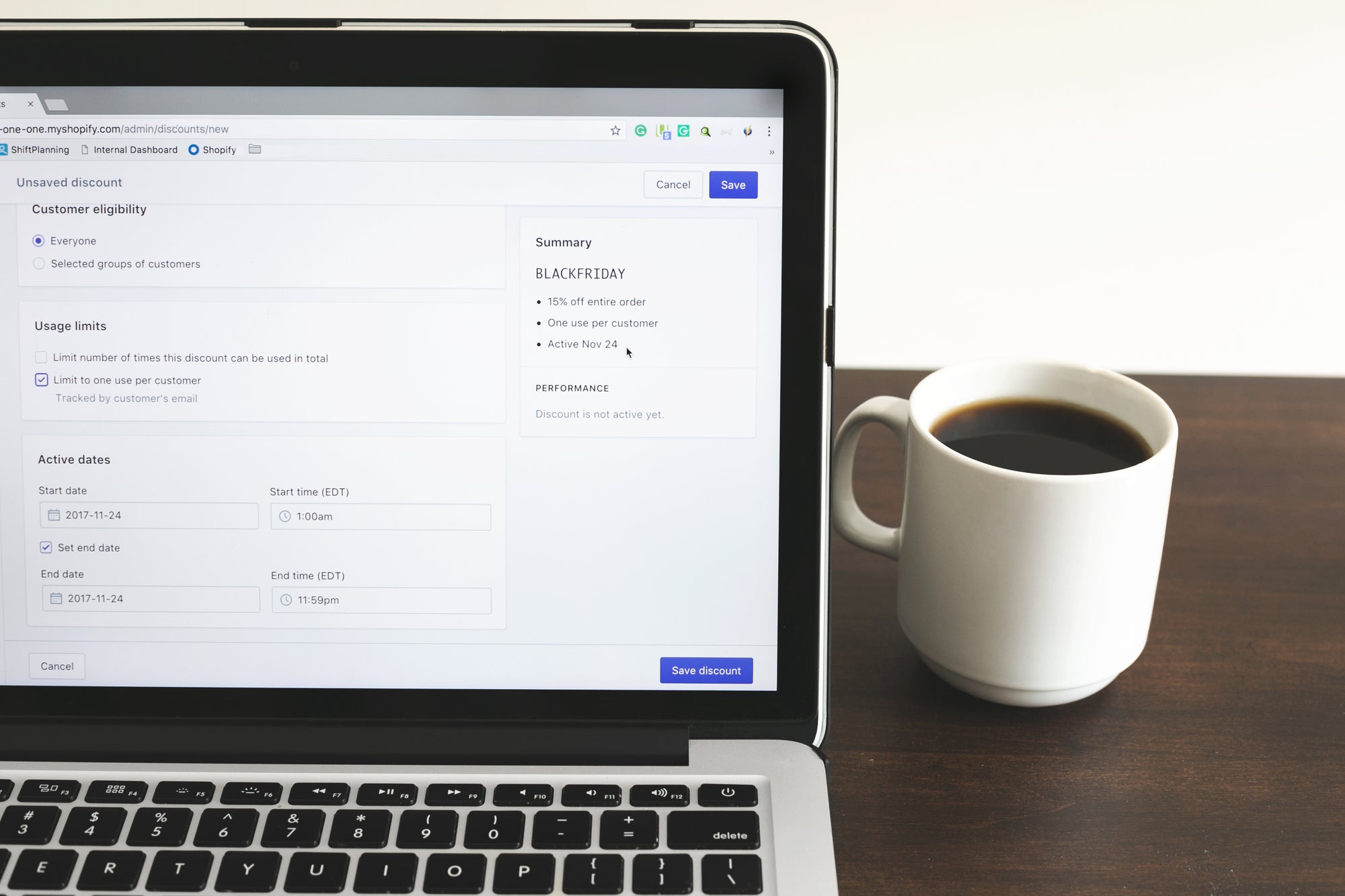
Yes. An automatic discount can be limited to a customer segment, so members get their discount without a code and without an app. What it does not do is change the price on the product page.
As of November 2026, Shopify supports customer-segment eligibility for both automatic discounts and discount codes, and can recognise an eligible customer at checkout by their email address or phone number (managing discounts). A simple member offer:
- Tag your members and create a customer segment for them.
- Create an amount-off automatic discount.
- Choose the eligible products or collections and the discount value.
- Under customer eligibility, choose the member segment.
- Add any minimum purchase requirement and test a checkout as an eligible customer.
Because the product page keeps the regular price, tell members about the offer near the price: “Members get 20% off this product at checkout.” Codes still work for occasional rewards; restricting a code to eligible customers limits who can redeem it, while a single-use limit only controls how many times it is used.
How do I set up Shopify wholesale pricing without Plus?
Use native B2B catalogs on Basic, Grow or Advanced: company buyers sign in and see their wholesale prices, while retail shoppers keep your regular prices in the same store (Shopify blended stores). Start by checking whether your wholesale business fits company accounts and catalogs.
On Basic, Grow and Advanced, you can have three active catalog assignments across active B2B markets; using the same catalog in two markets counts twice. Plus removes that limit and lets you assign catalogs directly to companies and company locations. Quantity rules, quantity price breaks and net payment terms work on all four plans (B2B features by plan).
Native B2B fits buyers who purchase for a company: they sign in and shop for a company location to get its prices. A retail VIP club starts elsewhere — an individual earns a benefit — so a segment discount or a customer-tag pricing app usually fits it better. More in our guides to Shopify B2B without Plus and whether Shopify is good for B2B, or see our Shopify B2B and wholesale services.
How do I set up tiered pricing on Shopify?
Use separate automatic discounts for a simple retail offer, B2B price breaks for company buyers, or an app when tiers should count across several products and show while customers browse. Choose by who qualifies and what customers should see before checkout.
Automatic discounts for a simple tiered offer
One amount-off discount has one minimum quantity or spend requirement. For several levels, create one discount per level and don’t let them combine: when several discounts qualify but can’t combine, Shopify applies the best saving for the customer’s cart (combining discounts). These discounts don’t change product page prices, so state the tiers next to the price.
B2B price breaks for company buyers
Native B2B volume pricing works on every plan from Basic to Plus. Buyers qualify by the quantity of each variant: 20 blue hats reach a price break, 10 blue and 10 grey don’t. A supported theme can show the price breaks on the product page to signed-in company buyers (displaying B2B price breaks).
VIPrice for customer-group tiers
VIPrice, our app, can count items or spend across one offer’s products, all campaign products or the whole cart, and only products in the offer get the discount. Shoppers see the price they will pay for what is in their cart, not a table of every tier, so describe the offer beside the price: “20% off from one item, 30% off from five.” At five items, all five get 30%.
How do I run a private sale or VIP early access on Shopify?
First decide what is private: the price or the products. For early access to a lower price, limit a discount or pricing campaign to your chosen customers. For early access to the products themselves, you also need to control who can view or buy them.
Give VIPs the sale price first
Use a customer-segment automatic discount or a restricted discount code when savings at checkout are enough. Sending the offer only to your email list does not limit who can redeem it; set customer eligibility too (managing discounts).
To show the sale price while VIPs browse, use a VIPrice campaign for customers with a VIP tag and ask members to sign in, or send a special link and combine it with the tag if only approved members should qualify. Set start and end dates so VIPs get their price before the public sale, and plan the public offer separately.
Control access to the products separately
VIPrice changes prices; it does not hide products or stop other shoppers from buying them at the regular price. For products only approved customers may buy, use a product-access app or B2B catalogs. Shopify’s Unlisted status keeps a product out of normal browsing, but anyone with its link can still buy it. To close the whole store, use password protection.
Does editing theme code or duplicating products change checkout prices?
Changing the displayed price in your theme does not, by itself, change what the customer pays; the lower price needs a matching discount behind it. Duplicated products charge their own price, but you then have to control who can buy them.
Showing “VIP price: $96” beside a $120 product helps only if an eligible buyer can actually pay $96. Treat the price on the page and the price at checkout as one project.
A separate wholesale product can make sense for a genuinely different pack, such as a case of 12. For the same item sold to different groups, duplicates mean double descriptions, stock and reviews — and calling a variant “Wholesale” or hiding it from the menu does not stop anyone from buying it.
How do I show the discounted price on the product page?
For a public sale, lower the product price and set a higher compare-at price; every shopper sees the sale. For a price that only some customers should see, you need an app or custom work that shows the price to those customers and applies the same discount at checkout. Creating an automatic discount alone does not update product and collection pages.
How does VIPrice give VIP customers their own prices?
VIPrice shows qualifying shoppers their campaign price on collection, product and cart pages, then applies the same discount automatically at checkout — no codes. VIPrice is our app; you can find it on the Shopify App Store. It works on every Shopify plan, no Plus needed.
Who can get a campaign price?
- Customers with a tag: approved VIPs, members or wholesale buyers sign in and see their prices.
- Shoppers in selected countries: the campaign follows the shopping country, and the delivery country is checked at checkout.
- Anyone with a special link: shoppers open the campaign link from your email or SMS and see the prices without logging in.
Conditions can be combined. A link can be forwarded, so for an offer only for known members, require both the link and a customer tag. For link visitors, VIPrice hides the express checkout buttons on the product page so they go through the cart, where their price applies.
What prices and offers can you set?
You choose the products with product tags and set a percentage or a fixed amount off each eligible item. You can add quantity or spend tiers, and free shipping for the whole campaign or above a threshold. A fixed amount is a reduction from the current price, not a separate price list: $24 off a $120 product gives $96. Campaigns can be scheduled, previewed on your theme before they go live, and ranked by priority if a shopper qualifies for more than one.
Store setup is automatic: VIPrice adapts the price display to your theme in about 5–10 minutes, with no code to write. Preview your real pages before going live, and again after changing themes.
What does each plan include?
- Free: set up campaigns and preview prices on your theme; no live prices or checkout discounts.
- Growth — $9.99/month or $99.99/year: live prices, automatic checkout discounts, customer-tag campaigns, quantity and spend tiers, free shipping.
- Pro — $19.99/month or $199.99/year: everything in Growth plus country campaigns, special links, discount names translated at checkout, blocking other entered discount codes, and hiding shipping or payment methods such as Cash on Delivery during a campaign.
Prices are in USD as listed on the App Store in November 2026, with a 7-day free trial. Hiding payment methods follows Shopify’s rules: below Plus in the US and Canada it applies to non-card methods (checkout customization). VIPrice fits group discounts and private promotions; for company-specific price lists and payment terms, look at native B2B first.
How do I set up VIP pricing and quantity tiers with VIPrice?
Choose the customers, choose the products, enter the discounts, preview, then test a real checkout with an eligible customer before you announce the offer.
- Customers: tag approved members “VIP” and use that tag in the campaign. Ask members to sign in.
- Products: add a product tag to the sneakers in the offer and select it.
- First tier: 20% off from one item — a $120 pair becomes $96.
- Second tier: 30% off from five items — each pair becomes $84, $420 for five before shipping and taxes.
- What counts: decide whether quantities count per offer, across all campaign products or across the whole cart.
- Preview and go live: check the storefront, choose a plan with live prices, confirm priority, then activate or schedule.
At five items, every qualifying pair gets 30%, not just the fifth. If you use Shopify Sidekick, it can read your VIPrice campaigns and prepare a new one for you to review and save.
Which method should I use?
Use native discounts when a discount at checkout is enough, a storefront pricing app when chosen shoppers should see their price while they browse, and B2B catalogs for company purchasing.
You run a VIP or membership club
Start with a segment-based automatic discount for a simple ongoing benefit. Choose a storefront pricing app such as VIPrice when members should see their price on collection and product pages after signing in.
You sell to wholesale buyers
Check native B2B first when buyers need company accounts, catalogs, payment terms or order rules. A customer-tag discount fits approved buyers who simply get a percentage off and pay through your normal checkout.
You want a private sale by link
Use a Shopify discount link for savings at checkout, or a storefront pricing app for sale prices while recipients browse. See private sales and VIP early access for limiting who qualifies and who can buy.
You need different prices by country
Use Shopify Markets for standing country prices and price adjustments. Use a country campaign for a time-limited promotion, and test what happens when a shopper changes country or delivery address.
You want quantity tiers
Separate automatic discounts cover simple levels, B2B price breaks count per variant, and VIPrice can count across a group of products. See tiered pricing on Shopify.
What should I test before customers see their new prices?
Test what an eligible buyer sees and pays, then repeat as a regular shopper.
- Who is shopping: signed out, signed in as an eligible customer, signed in without eligibility.
- Where the price shows: collection cards, product variants, cart drawer, cart page and checkout.
- Tier thresholds: just below and at each level, including removing items.
- Other offers: sale-priced products, entered codes and other automatic discounts.
- Campaign conditions: overlapping audiences, special links, countries and scheduled dates.
- Checkout options: shipping charges, payment methods and express checkout.
Shopify allows up to 25 active automatic discounts, including app discounts, and your combination settings decide which offers can apply together (automatic discounts, combining discounts). Keep the customer message just as clear: who qualifies, which products count, and whether signing in is needed.
Mgroup is a Shopify Select Partner. If your pricing mixes retail memberships and wholesale ordering, talk to us about your setup.