

Headless Shopify stores have become one of the hottest trends in eCommerce. Research shows that 61% of retailers have already implemented or plan to implement Headless commerce solutions. These numbers make sense when you look at consumer behavior. About 40% of shoppers abandon a site that takes more than three seconds to load. Even more telling, 82% of consumers say that slow loading speeds affect their decision to buy.
Our experience shows that traditional eCommerce setups don't deal very well with today's performance demands. The numbers tell an interesting story: businesses making $100,000 daily can generate an extra $7,000 just by improving their load time by one second. That's where Headless Shopify architecture makes a real difference by keeping the frontend presentation separate from the backend eCommerce functions.
Building custom eCommerce solutions has taught us the importance of choosing between Headless Shopify and traditional setups. The Headless approach makes shared frontend experiences possible across different customer touchpoints. However, this flexibility comes with its own set of challenges in complexity and upkeep.
This piece breaks down everything about building a Headless Shopify store. You'll learn about its benefits, challenges, and core architecture components. On top of that, you'll understand how headless approaches differ from composable commerce, helping you pick the right solution for your business.
What is a Headless Shopify store?
A Headless Shopify store keeps the front-end presentation layer (what customers see) separate from the back-end infrastructure (where product data, pricing, and inventory management live). This setup is not like traditional eCommerce platforms. The split architecture lets businesses create custom shopping experiences while using Shopify's resilient commerce engine.

How Headless is different from traditional Shopify
Traditional Shopify uses a monolithic architecture that connects the front-end and back-end tightly. Any changes to the user interface affect the back-end directly. This limits creative freedom and customization options. Traditional setups also restrict developers to Shopify's native Liquid theme engine for both presentation and functionality.
A Headless Shopify store gives developers full control over the front-end experience. Teams can change the storefront without affecting back-end operations. Traditional Shopify excels at convenience and simplicity. Headless shines when businesses need complex solutions or want unique customer experiences.
This split lets brands:
- Design custom user interfaces with any front-end technology
- Update the visual presentation without disrupting commerce functionality
- Create multiple front-ends for different channels while you retain control of a single back-end
- Build storefronts with frameworks like React, Next.js, or Vue.js
API-first architecture explained
API-first approach is the heart of Headless commerce. The front-end and back-end communicate through Application Programming Interfaces (APIs) because they're separate. Shopify's Storefront API is the foundation of the Headless platform. It provides access to essential commerce features.
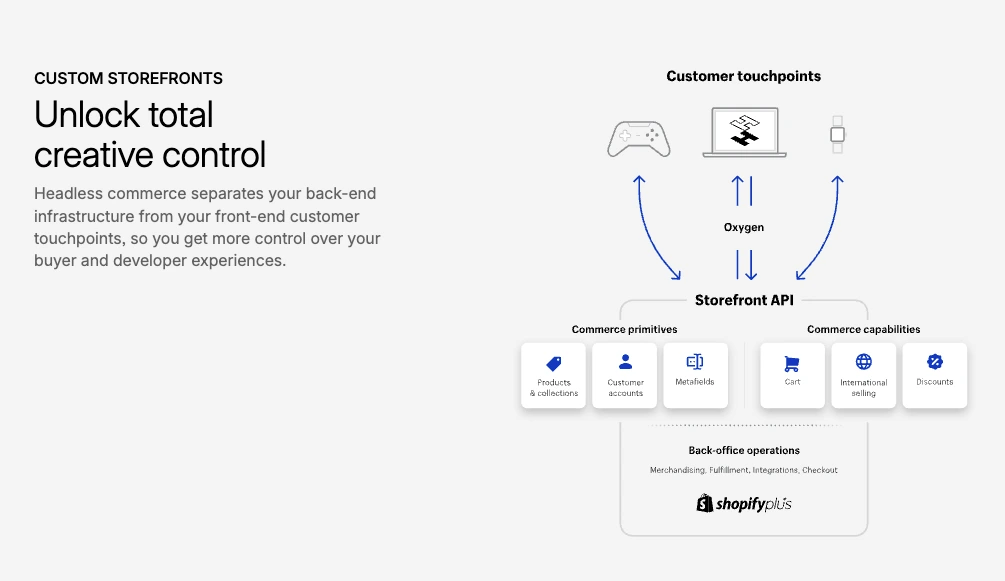
The API layer works like a messenger. It defines how your store connects to and shares data with various systems. Developers can use the Storefront API to pull product information, handle cart operations, and create checkout flows while building custom interfaces.
An API-first architecture focuses on:
- Modularity: Small, scalable microservices replace monolithic systems
- Standardization: GraphQL protocols ensure consistent data exchange
- Flexibility: One back-end system supports multiple front-ends
This setup helps Headless Shopify stores work on any digital platform—websites, mobile apps, smart mirrors, kiosks, and IoT devices.
Why brands are moving to Headless
Recent surveys show 76% of large companies plan to adopt Headless technology within 12 months. Several key factors drive this trend:
Performance optimization leads the way. The separate front-end means faster page loads through independent optimization. Ruggable kept 100% uptime during Black Friday after switching to Headless. Sennheifer saw a 4.5% boost in conversion rates.
Creative freedom stands out as a major benefit. Brands create unique shopping experiences without template restrictions. This leads to better personalization and customer engagement across all touchpoints.
Omnichannel capabilities matter more as people shop on multiple devices. Headless Shopify creates consistent experiences across web, mobile, voice interfaces, and physical locations—all from one back-end.
Technical flexibility attracts development teams who want modern tools. Shopify's Headless solutions like Hydrogen (a React-based framework) and Oxygen (a hosting solution) let developers work with familiar technologies.
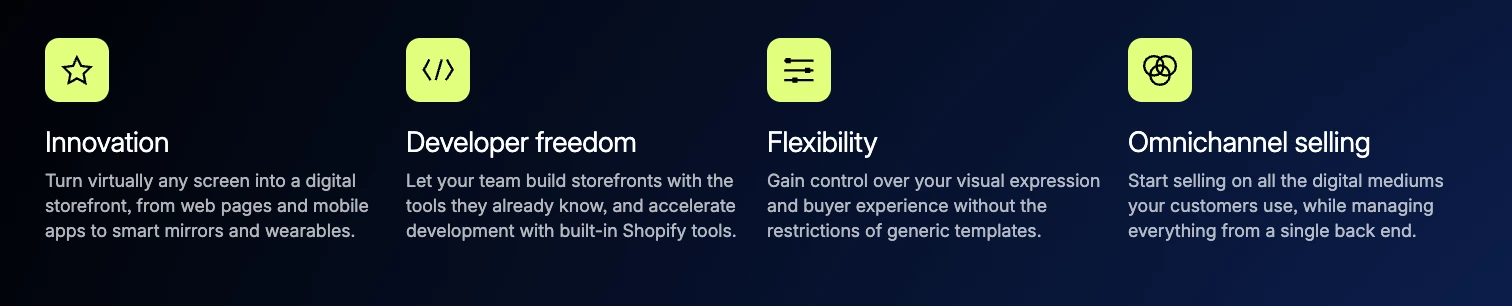
Brands choose Headless Shopify to stand out through custom experiences while relying on Shopify's commerce engine. A Kotn engineering director put it well: "We went with a Headless architecture because it brings a lot of the customizations we wanted to control directly to our fingertips".
Is it worth it? Decide that first
This guide assumes the decision is made. If it is not, read is headless Shopify worth it first: it covers the build and running costs, where headless pays off, the trade-offs, and a five-question test. For the stack choice specifically, Shopify Hydrogen vs Liquid compares the two front ends. Everything below is about how to build it well once you have said yes.
Typical Headless Shopify architecture
Building a Headless Shopify store needs a clear understanding of its core architecture. Modern eCommerce experiences work through distinct but connected layers that communicate via APIs.
Frontend frameworks: React, Next.js, Hydrogen
JavaScript frameworks power the presentation layer of a Headless Shopify implementation. React serves as the base for many Headless storefronts. Its component-based architecture lets developers create reusable UI elements.
Hydrogen, Shopify's official Headless solution, builds on these foundations. It uses the React-powered Remix framework and comes with commerce-optimized components, hooks, and utilities that work with Shopify's APIs. Developers can build faster without sacrificing performance through this modular approach.
Next.js stands out as a popular choice for Headless Shopify projects, especially among big companies. Major brands like McDonald's, Apple, and Nike use Next.js for their digital presence. The platform shines in eCommerce applications thanks to its hybrid rendering features, including static site generation (SSG) and server-side rendering (SSR).
Backend services and APIs
Every Headless Shopify store runs on Shopify's strong backend system. This handles key commerce functions such as:
- Product and inventory management
- Order processing and payment handling
- Customer data and accounts
- Pricing and promotions
Two main APIs connect these systems. The Admin API handles orders, inventory, and customer data. The Storefront API manages customer-facing experiences. These APIs work together to create a complete system for Headless stores.
How Storefront API connects the layers
The Storefront API bridges the gap in Shopify Headless architecture. Through GraphQL queries, developers can access essential commerce features like:
- Optimized cart functionality
- Product and collection data
- Search and recommendations
- Contextual pricing
- Subscription management
The Storefront API works with any framework. Developers can use their preferred tools while staying connected to Shopify's commerce engine.
Hosting with Shopify Oxygen or third-party
Headless Shopify storefronts need a hosting solution. Shopify Oxygen provides specialized hosting for Hydrogen-based stores. Your store loads fast worldwide through 285+ global points of presence. Most Shopify plans include this service at no extra cost.
Stores built with other frameworks have many hosting options. Vercel works great for Next.js projects, while Netlify and traditional cloud providers offer alternatives. Each platform comes with its own mix of performance, developer experience, and pricing.
This separated architecture lets brands create unique Headless Shopify store experiences while keeping Shopify's reliable commerce backbone.
Composable commerce vs Headless: key differences
A more comprehensive approach to eCommerce flexibility exists beyond the Headless architecture. These concepts share similarities but have fundamental differences.
What is composable commerce?
Composable commerce extends modular design beyond separating frontend and backend. The entire commerce stack breaks down into independent, specialized components (or "packaged business capabilities") connected through APIs. The concept works like LEGO bricks - businesses can pick the best solutions for each commerce function, from cart and checkout to search and payments.
This model aligns with MACH principles: Microservices, API-first, Cloud-native, and Headless architecture.
Composable vs Headless: use cases
| Aspect | Headless Commerce | Composable Commerce |
|---|---|---|
| Architecture | Decouples frontend only; backend remains unified | Modularizes both frontend and backend |
| Flexibility | Custom UI/UX; limited backend customization | Full customization across entire stack |
| Development | Faster implementation (2-3 months) | Longer build time (6-12 months) |
| Cost | Lower initial investment | Higher investment, multiple vendors |
Brands seeking creative freedom and better performance without backend changes benefit most from Headless architecture. Enterprises needing complete control over presentation and business logic should consider composable commerce.
When to choose Shopify composable commerce
Your business should consider Shopify composable commerce if you need to:
- Update specific backend functions without affecting the whole system
- Combine specialized services in a variety of channels smoothly
- Scale different parts of your operation independently
- Protect your business against future technology changes
Step-by-step: building a headless Shopify store
1. Audit what the storefront does today
List every template, every app that touches the storefront, every integration and every piece of content marketing edits. Mark each app as “has an API or headless SDK”, “must be rebuilt” or “can be dropped”. This list is the real scope; the design comes second.
2. Choose the framework and hosting
Hydrogen on Oxygen keeps hosting, caching and checkout integration on Shopify’s side and is the default choice for a store whose only headless surface is the web storefront. Next.js or another framework on Vercel, Netlify or your own infrastructure fits teams that already run that stack for other properties or need one front end across several backends. Decide now, because it sets the team you need.
3. Model content and pick a CMS
Products, collections and customers live in Shopify; everything else — landing pages, editorial, campaign blocks, navigation — needs a home your marketing team can edit without a developer. Sanity, Contentful and Storyblok are the usual choices. Define the content types before the front end is built, or the front end will be built around placeholder text.
4. Wire the Storefront API
Product and collection queries, cart creation and updates, customer accounts, Markets for currency and language, and search. Pin an API version, plan for quarterly version bumps, and cache product data at the edge so a traffic spike does not turn into API rate limits.
5. Keep checkout on Shopify
The cart hands off to Shopify’s hosted checkout with Shop Pay and express wallets intact. Do not rebuild checkout; you would lose payments, fraud tooling and conversion features for no gain. Make sure the handoff carries discount codes, customer identity, market and any attributes your apps rely on.
6. Rebuild the integrations that matter
Reviews, subscriptions, loyalty, search, analytics events and marketing pixels. Each one is a task against the vendor’s API. This is where headless budgets are made or lost, which is why step 1 exists.
7. Build the SEO plumbing in, not on
Server-side rendering for every indexable page, canonical URLs, pagination, hreflang for Markets, structured data (Product, Breadcrumb, Organization, FAQ), XML sitemaps, robots rules and a complete 301 map if any URL changes. Treat this as a launch blocker; a headless launch without it is the most common cause of a post-launch traffic drop.
8. Test with real data and real devices
Real products, real orders through a test gateway, real customer accounts, real ERP syncs. Core Web Vitals on the key templates from the field, not only the lab. Every app integration exercised end to end. Our testing checklist is the baseline; headless adds API failure modes and caching bugs that look like inventory errors.
9. Launch with a rollback and a retainer
Keep the Liquid theme publishable for a fast rollback, launch on a quiet day, and have engineering on call. Then start the maintenance rhythm on day one: dependency updates, API version changes, and the features Shopify ships to themes that a headless store has to add by hand. A store without that rhythm degrades quietly. Our Shopify Hydrogen development team builds and runs this stack; the Oxygen deployment guide covers the hosting side.
Conclusion
Brands that want to stand out in the competitive eCommerce world should build a Headless Shopify store. As I wrote in this piece, separating frontend presentation from backend commerce gives you exceptional flexibility and better performance.
A one-second speed boost can generate thousands in extra daily revenue. Your brand can create unique experiences instead of following template rules. The Headless architecture lets you deliver consistent experiences through websites, mobile apps, and other touchpoints.
In spite of that, you should think about some trade-offs. Teams face real challenges with higher development costs, technical complexity, limited app compatibility, and longer setup times. You need to weigh these factors against your business needs and technical resources.
The building blocks we discussed are the foundations for successful Headless implementation. React and Next.js frameworks, Shopify's Storefront API, and hosting options play key roles. Your choice between fully composable commerce and Headless depends on whether you need complete system flexibility or just frontend control.
Your long-term business strategy and customer experience goals should drive the decision to build a Headless Shopify store. The Headless approach is a great fit for brands that need unique digital experiences, better performance, and technical flexibility. Ready to build a high-performance Headless Shopify store? Contact Shopify Development Agency Mgroup to get a custom technical plan for your growth journey.