

Custom Shopify apps give developers and entrepreneurs a remarkable chance to succeed. The numbers tell an interesting story - store owners typically use six apps to run their business. This shows how these tools play a vital part in their success. The Shopify App Store has grown to include more than 10,000 apps by 2024, which shows there's still plenty of room to build new solutions.
The Shopify ecosystem makes app development an attractive field. Every part of a merchant's experience - from product sourcing to marketing, order fulfillment, and customer management - has become a billion-dollar industry on its own. Shopify helps store owners manage their business from one place. Millions of merchants actively look for tools to boost their online stores. Developers who want to build standout Shopify apps face both challenges and exciting possibilities.
This piece walks you through everything in custom Shopify app development. You'll learn practical tips to avoid common pitfalls and see real-life examples that show successful implementation strategies. The content helps both experienced developers and newcomers to create custom apps that solve merchant problems effectively.
Why Build a Custom Shopify App?
The need to build a custom Shopify app comes from actual business demands, not just technical interest. Today's digital world shows that ready-made solutions don't help merchants reach their goals or match their specific needs.
Solving unique merchant problems
Each business runs its own way. That's why custom Shopify app development brings such great value. These custom apps match specific business workflows and give you the exact features you need, unlike ready-made options. To name just one example, see how a merchant selling custom products might need an app that lets customers set up orders in special ways - something standard apps can't do.
The real power of custom app development shows when it tackles problems specific to your business model. A logistics company might need to track delivery routes in real-time to get packages there on time. Custom Shopify apps help businesses turn tough processes into optimized operations.
Your agency for Shopify development knows that custom applications work as middleware. They connect older systems with modern microservices. This connection removes the hassle of using separate tools and creates one smooth system for your business.
Unlocking automation and efficiency
Manual work wastes time and leads to mistakes. Custom Shopify apps shine at automating essential tasks like data entry, reports, and job assignments. This automation doesn't just save time - it changes how businesses work completely.
A well-built custom app automates repetitive work like managing inventory, updating customers, and processing orders. Picture a store that tracks stock levels automatically. Staff won't need to count items by hand to keep products available for customers.
These changes bring clear business improvements. Companies that use automation tools see huge benefits. They cut manual work by 50-70%. On top of that, it reduces the need for manual labor. You'll spend less on overhead costs and won't depend so much on outside services.
At Mgroup, your Shopify development agency, we've watched creating a Shopify application transform daily tasks from time-consuming chores into smooth, efficient processes.
Opportunities in the Shopify App Store
Developers who want to build Shopify apps for a wider audience should look at the Shopify App Store. This marketplace connects solutions with millions of potential users through over 8,000 available apps.
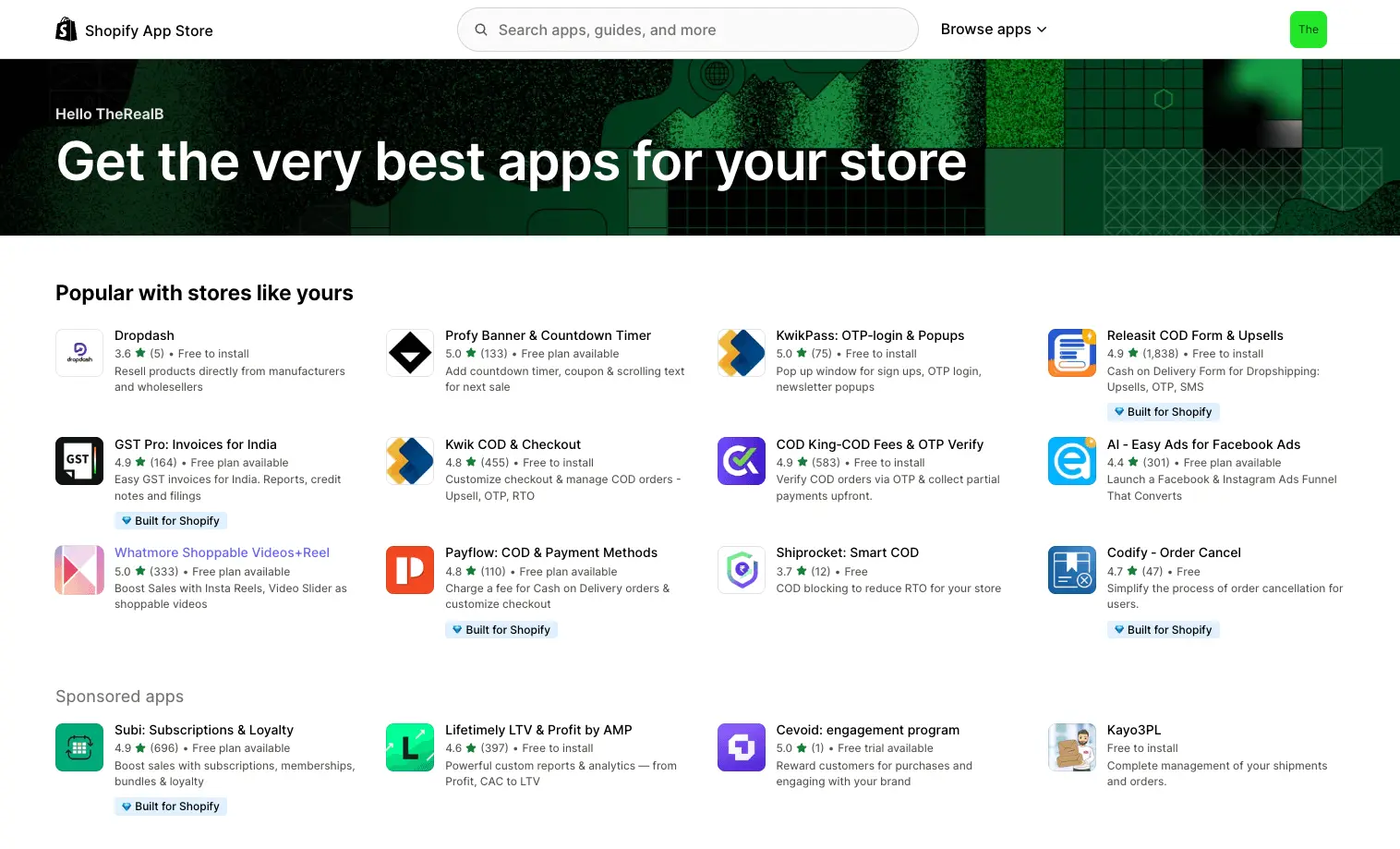
The App Store gives developers several advantages:
- Enhanced visibility: Apps show up in category pages, search results, and search engines
- Trust building: Better reviews help your app rank higher in searches
- Verification: Apps must pass a 100-point review before listing
Building Shopify apps for public use lets you reach Shopify's huge merchant base. Millions of merchants look for tools to improve their stores. A well-positioned app can grow quickly.
Revenue potential and monetization models
Custom Shopify app development offers great financial rewards. As a Shopify app builder, you can pick from several proven ways to make money:
The freemium model gives basic features free while charging for advanced ones. This approach gets more downloads and turns users into paying customers as they need more features. Subscription models bring steady income through monthly or yearly payments. These work great for apps that provide ongoing value.
Shopify now offers better revenue sharing terms. Developers pay just 15% on yearly app revenue instead of 20%. Better yet, they pay nothing on their first $1 million in yearly revenue.
Our Shopify app development team team suggests you study your target customer, app type, and long-term support plans before choosing an approach. This smart planning helps your custom Shopify app solve problems and create lasting revenue.
Planning Your Custom App Development
The success of your custom Shopify app relies on good planning before you write any code. Good planning will help you avoid getting pricey changes later and your app will actually solve real problems. Thinking about creating a custom Shopify app for your store? Shopify development agency — Mgroup is here to help.
Identifying pain points and feature gaps
Building a successful custom Shopify app starts with finding real merchant problems. The best opportunities for app solutions come from common complaints in merchant communities. You should research through:
- Shopify Community Forums and subreddits where merchants talk about their challenges
- Reviews of existing apps to find feature requests that don't get much attention
- Direct conversations with merchants to learn about their daily frustrations
Preetam Nath, who built several successful Shopify apps, spent two months learning about merchant needs before starting development. This investment turned out to be vital to his app's success. Looking at competitor app reviews showed him big gaps—"It took me a whole day, but it was worth it because now I knew clearly what merchants gave five-star reviews for, and also what they hated".
Choosing between public and private apps
Your Shopify app's distribution method needs early decision because you can't change it later. The options got simpler after January 2022 when private apps were phased out. Now you can build:
- Custom apps: Made for just one Shopify store, not found on the App Store
- Public apps: Open to all merchants through the Shopify App Store
Custom apps give you room to meet specific business needs while keeping internal processes secure. Public apps reach more merchants through the Shopify App Store, where store owners look for tools to make their stores better.
Validating your idea with real merchants
Before you spend months on custom app development, make sure merchants actually want your solution. Product validation research shows this step helps "beat the odds by proving product-market fit before investing months (and millions) into development".
The quickest ways to verify your idea include:
- Building a landing page about your concept and tracking email signups
- Talking directly to merchants about your solution
- Looking at search volume and trends for related problems
- Testing sales interest to see if people will pay—"Making a few sales is a great way to verify your product"
Defining your MVP and roadmap
After verification, build a Minimum Viable Product (MVP) that nails one core problem really well. Your MVP doesn't need every feature—just enough to deliver value and get feedback.
Your Shopify custom app roadmap should break development into smaller goals. Set clear success metrics as key performance indicators (KPIs) to measure results objectively. Your user personas should guide every decision—"Every design choice should match what your user persona needs & wants".
A trusted agency for Shopify development can guide you through these planning stages. Taking time to get these foundations right before development starts will give you better chances of building a custom Shopify app that merchants need and want to buy.
How to Build a Shopify App: Technical Foundations
Building a successful custom Shopify app requires mastery over several core components. Mgroup, your Shopify development agency helps merchants and developers create powerful solutions quickly through our refined process.
Setting up your development environment
A proper development environment must exist before you write code for your custom Shopify app development. The Shopify CLI accelerates your app development with features like app template generation, app extension creation, and automated development tasks. Your directory structure should follow conventions to make this tool work properly.
You can choose between two installation options. Global installation works best to manage multiple projects. Local dependency installation suits team synchronization better. Your workflow priorities determine whether to keep a localized setup or switch to global install when working with existing apps using Shopify CLI.
Using Shopify CLI and Partner Dashboard
The Shopify CLI becomes your main tool to build Shopify apps once your environment stands ready. Start a new app with:
npm init @shopify/app@latest
This command helps you create an app using templates like React Router. Your local server starts with:
npm run dev
The CLI handles everything automatically - developer account authentication, app creation in Dev Dashboard, database setup, and secure tunnel creation between your local machine and development store.
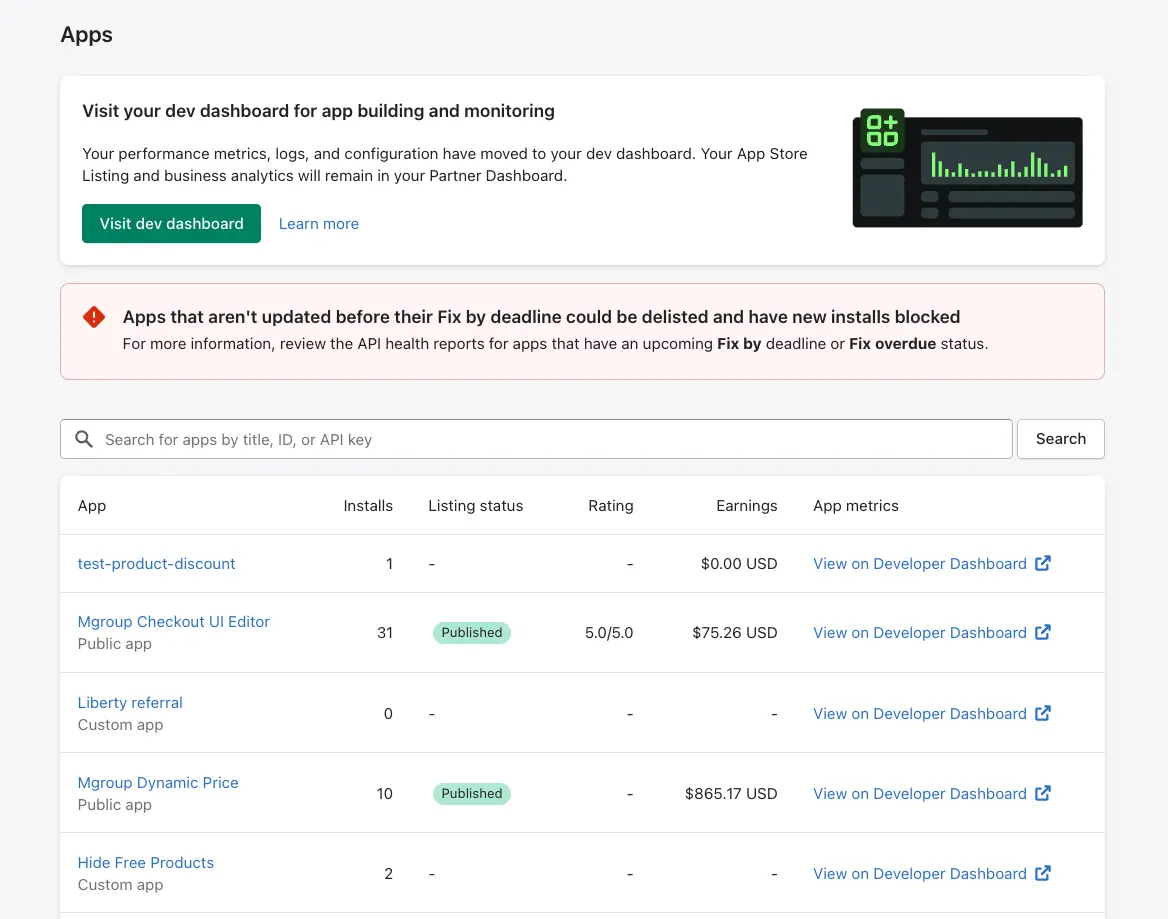
Integrating with Admin and Storefront APIs
A Shopify app builder must know which API suits their needs. Store management functions live in the Admin API. The Storefront API takes care of customer commerce operations.
Product viewing, cart management, and checkout capabilities come from the Storefront API. The Admin API lets you control products, orders, and customer information. Each API uses different authentication methods. The Admin API needs an access token from app installation. The Storefront API supports both tokenless access for simple features and token-based auth for advanced functions.
Handling authentication and permissions
Security in your custom Shopify app relies on solid authentication and authorization. Your app asks for specific access scopes during installation based on required store data. These permissions control your app's data access levels.
Your app should request minimal data access to work properly. To cite an instance, apps can see the last 60 days of orders by default. The read_all_orders scope (needing approval) gives access to complete order history.
Using webhooks for real-time updates
Your custom app can respond to store events instantly through webhooks. They notify your app right away when specific events happen, such as new orders or inventory changes, instead of constant polling.
Webhook implementation starts with topic subscriptions through your app configuration file or Shopify's GraphQL Admin API. Each webhook carries metadata in headers and event data in payload. A reliable implementation needs webhook validation to check authenticity and proper error handling for retries.
Our Shopify app development service helps you master these technical foundations to Create a Shopify Application that matches your business requirements perfectly.
Tips for a Smooth App Launch
Launching your custom Shopify app needs close attention to details that drive merchant adoption. At the same time, partnering with a Shopify development agency — Mgroup makes this crucial phase easier.
Testing for performance and usability
Your custom app development success depends on performance testing. The App Store will only publish apps that don't lower storefront Lighthouse performance scores by more than 10 points. Test your app in different scenarios to review its responsiveness, stability, and reliability. Set clear performance benchmarks and analyze results to spot potential bottlenecks.
Creating a compelling app listing
A great listing can substantially boost conversion rates. Your images should look professional—keep icons free of text and stick to simple designs with clear colors. The app description works best with a problem-agitate-solution approach to connect with potential users. High-quality screenshots that highlight core features will complement your compelling copy.
Meeting Shopify's submission requirements
Shopify's App Store review page walks you through required fields and automated tests to minimize common errors. Good preparation will speed up your approval process. Apps often get rejected due to authentication problems, billing API issues, and incomplete listings.
Preparing support and documentation
Quality documentation shows your custom Shopify app's excellence and professionalism. Focus on helping merchants achieve their goals rather than explaining technical details. Our Shopify app development team creates user resources that boost retention and generate better reviews.
Post-Launch Growth and Real-World Examples
The real work of growth starts right after your custom Shopify app goes live. Mgroup, your Shopify development agency, can help you implement the right strategies to scale your app effectively.
Tracking metrics with AARRR framework
The AARRR (Pirate) Metrics framework offers a well-laid-out path to Shopify app development success. This system breaks down the customer's trip into five stages:
- Acquisition: Finding where new users come from
- Activation: Seeing how users realize your app's value
- Retention: Looking at user return rates
- Revenue: Checking how well you monetize
- Referral: Measuring word-of-mouth growth
Clarity Stack CEO Ben Harper points out that "maximizing what you already have with your user base" is a vital part of post-launch revenue growth. Tracking metrics like Average Order Value, conversion rate, and Customer Lifetime Value reveals new growth opportunities.
Using feedback to improve features
Customer feedback guides your path after launch. Netflix showed this when they switched their rating system from five stars to simple thumbs up/down. This change led to a 200% jump in participation. The success of custom Shopify app development depends on how you track and respond to user data.
"We've seen tangible improvements across all areas by constantly tweaking and measuring our customer touchpoints," says Harper. Both numbers-based metrics and direct customer conversations give valuable insights to make things better.
Scaling infrastructure for more users
Your infrastructure needs to grow with your custom app. Here's the quickest way to scale:
- Look at both user feedback and hard data
- Watch conversion rates throughout the user's experience
- Find and fix bottlenecks that slow customers down
Better activation rates often beat getting more installs. Doubling setup completion from 20% to 40% gets you twice the active users without needing extra installs.
Case study: Plug In SEO's growth strategy
Plug In SEO shows what successful Shopify custom app growth looks like. This all-in-one SEO tool helps stores boost organic traffic through:
- Structured data/JSON-LD implementation
- Bulk meta title and description editing
- Broken link detection and fixing
- Periodic SEO health checks
Their templating technology lets merchants edit metadata for thousands of pages quickly. This shows how solving specific merchant problems leads to long-term growth.
Visit our Shopify app development service to learn how we can help grow your custom Shopify app.
Conclusion
Custom Shopify apps are powerful tools that help merchants solve their unique business challenges. This piece shows how these apps can turn manual processes into automated workflows. They bridge gaps between systems and create new revenue streams. We got into the key planning steps needed before development starts. These steps range from finding real pain points to proving your concept right with actual merchants.
Our technical foundation gives developers a clear path to build Shopify apps that combine smoothly with Admin and Storefront APIs. Of course, mastering these elements takes dedication, but the rewards make it worth the effort. A well-executed custom Shopify app development process guides you to create solutions that merchants need and want to pay for.
Your custom app launch needs solid performance testing, engaging store listings, and detailed documentation. Working with experienced professionals can make this process much easier. Looking to build a custom Shopify app for your store? Shopify development agency — Mgroup stands ready to help.
Success after launch depends on careful metric tracking, user feedback implementation, and proper infrastructure scaling. It also draws inspiration from real-life success stories like Plug In SEO. These stories show how targeting specific merchant pain points creates room for sustainable growth. Custom apps offer unmatched flexibility to meet merchant needs, whether you're building a private solution for one store or aiming for the Shopify App Store.
Before starting a build, review our Shopify app costs breakdown to compare build vs buy. Custom Shopify app development ended up filling the gap between generic solutions and what businesses really need. By doing this and being organized in your approach, you'll create apps that solve problems effectively. These apps will keep providing value to merchants in the competitive e-commerce world.